

![[Ready to use!] Loop YouTube videos by section and adjust playback speed freely with “YouTube Slow Player”](https://media.ragnet.co.jp/img/1200__jpg__https://www.studiorag.com/files/2017/07/ae46b1f460ee46f789c27b264a6cb421-9.webp)
[Ready to use!] Loop YouTube videos by section and adjust playback speed freely with “YouTube Slow Player”
I want to loop YouTube videos! I want to change the playback speed!
This time, I’m introducing a web service that lets you freely adjust the playback speed.
I’ve also summarized how to use it, so if you’re struggling with things like transcribing music by ear, please give it a try!
I want to change the playback speed of a YouTube video! I want to repeat it!

If you regularly play instruments like guitar, bass, or piano, or practice things like dance or English conversation, you probably often use YouTube videos for training and practice, don’t you?
I also often transcribe guitar phrases by ear, and since I watch a lot of videos, I end up staring down my computer with my instrument in hand.
Also, since I recently started taking English conversation lessons, I often watch English conversation videos.
every timeI want to listen to that part again.and so on; or something like that; for exampleI want to change the playback speed of the conversation.and such thoughts as well.
You can use the default YouTube app, but it only lets you adjust playback speed in broad steps—0.5, 0.75, 1.25, and 1.5—which is often too coarse for practicing guitar phrases, dance lessons, or English conversation.
On the other hand, with a local app that allows detailed settings, the process of downloading the video, importing it, and so on is extremely tedious.
So what I’d like to recommend is “YouTube Slow Player,” which lets you adjust playback settings right in your browser.
Ready to use! YouTube Slow Player
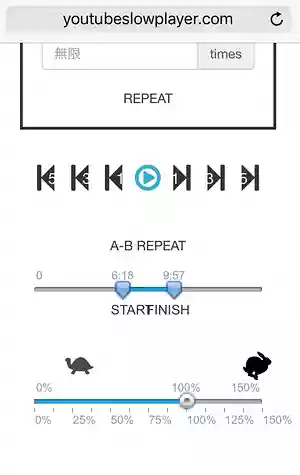
YouTube Slow PlayerDid you know there is a web service called that?
No registration is required, and it’s easy to use (and of course, free).
Main features include those for YouTube videos
- A–B repeat
- Adjust playback speed in 1% increments (with pitch preserved, of course)
- A feature that lets you skip every 1, 3, or 5 seconds.
- Specify number of repeats
something that can be done in the browser.
With this, using YouTube videos
- Play the phrase in slow motion
- transcribing by ear
- repetitive practice
It’s possible in the browser!
It can be fully utilized as a phrase trainer.
How to use
It's easy to use,
YouTube Slow Playeraccess
Just paste the URL of the YouTube video you want to play
You can use it!
By the way, the default display setting is English.
It seems to support Japanese as well (but for some reason it doesn’t open properly in my environment…).
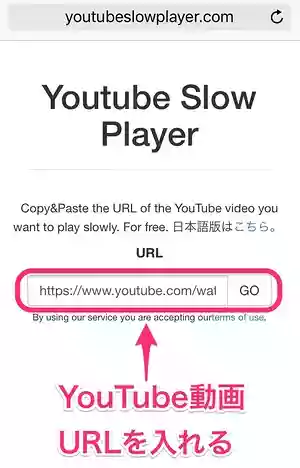
Enter a URL and press the "GO" button to display the YouTube video on the page.
It takes a little time to load, but once it’s loaded, it plays back stably after that.
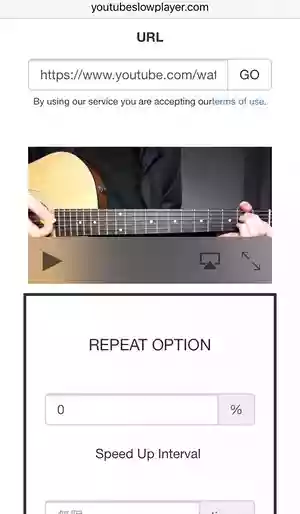
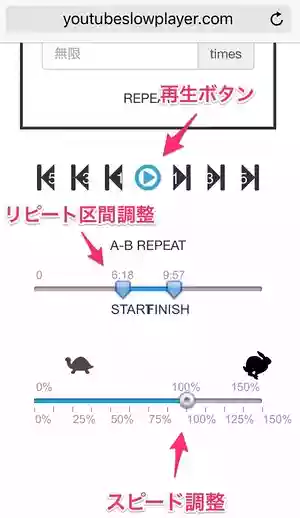
If you scroll down, options for A-B repeat adjustment and speed adjustment will appear.
There’s also a play button right nearby, so it’s convenient.
“A-B repeat” means setting a start point “A” and an end point “B,” then repeating that section.
Each time the section specified by A–B repeats, the playback speed increases.(The tempo speeds up) There's also a fun feature.
In other words,Start by practicing slowly, then gradually increase the speed.This will make repetitive practice possible!
In the REPEAT OPTION, the “Speed Up Interval”Stages of speeding upcan be adjusted.
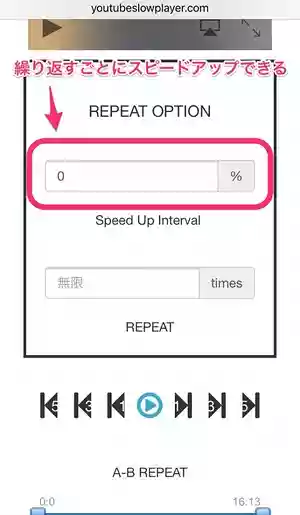
It's simple, yet easy to understand and use!
Since it's a web service, be sure to bookmark it or add it to your smartphone's home screen before you forget!
Lastly
By the way, this might be due to my settings, but there were times when it didn’t display properly in the Chrome browser (on a Mac).
If you use the Safari browser, it will work properly on both iPhone and Mac.
I think it would be very useful for things like transcribing music by ear, training, and English conversation lessons.
Please give it a try!